


TeamLive
4.7665.00 Reviews
App Specs
- Version
- 1.10.11
- Updated On
- License
- Free
- Downloads
- 100,000+
- Developer
- Harri
- Categories
- Business
- Platform
- Android
Screenshots
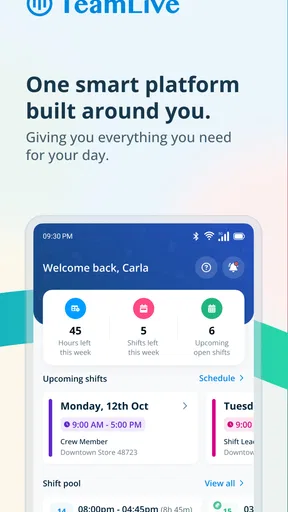
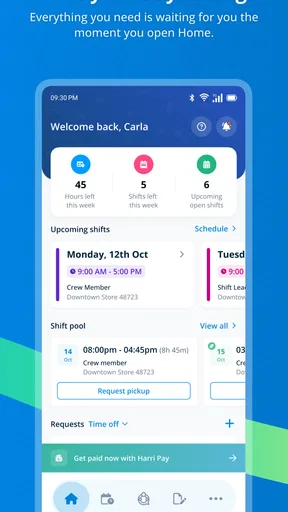
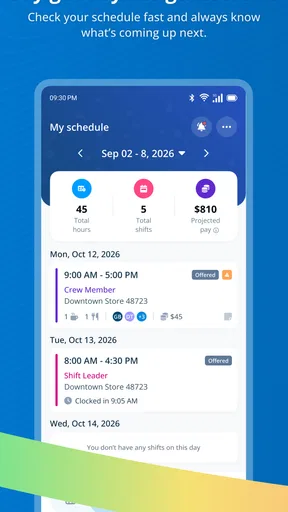
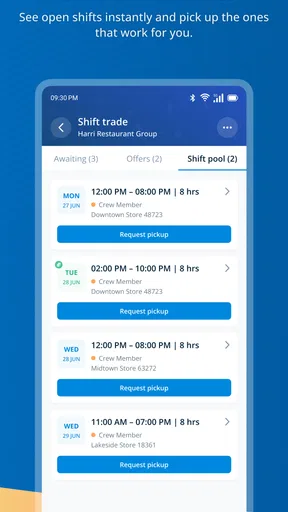
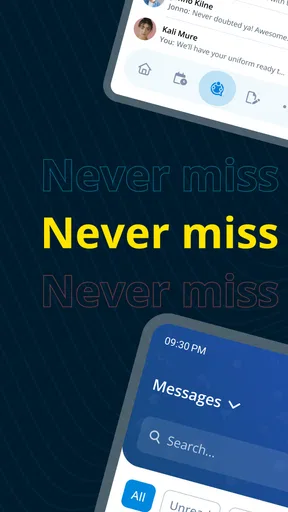
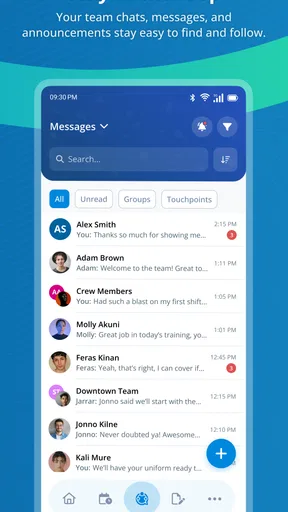
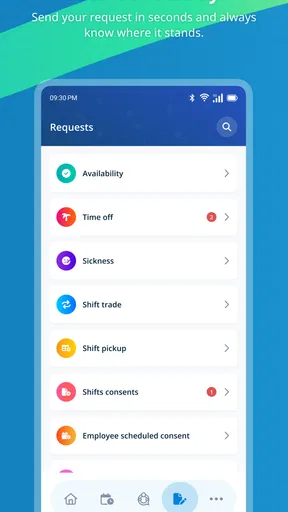
 Analysis by AppCompare
Work schedules often fail in small, exhausting ways: someone checks an old message, a shift changes without reaching the right person, or a manager has to repeat the same update across several conversations. I have found TeamLive most useful when the real problem is not creating a rota, but keeping a working team aligned after the rota exists. It brings scheduling and communication into one business-focused app, so the daily question is easier to answer: where do I need to be, when do I need to be there, and what has changed?
That sounds simple, but simplicity is exactly the point. A general messaging app can handle announcements, while a calendar can show appointments, yet neither is naturally built around the rhythm of shifts and team availability. TeamLive, developed by Harri, sits between those two habits. I would recommend it to people working in places where schedules move quickly and staff need one dependable place to check updates rather than searching through personal chats.
The app is free and available for everyone to use from an age-rating perspective. It belongs to the Business category, has passed the 100K-install mark, and holds a 4.7 average from around 6.6K ratings. Those figures suggest that it has found a real audience among teams that need practical coordination rather than a large collection of unrelated workplace tools.
Why TeamLive is useful when schedules keep changing
I find TeamLive most useful when a schedule is a moving target rather than a document people check once and forget. This section looks at how a shared work reference can reduce the small misunderstandings that pile up around shift changes, while the next part considers the practical habits that help a team keep that reference dependable.
The recurring problem is not the rota itself
In my experience, the hardest part of shift work is rarely seeing the original schedule. The trouble begins afterward. A supervisor needs to communicate a change, a colleague wants to check an upcoming shift, or somebody needs to remember an instruction that was sent several days earlier. When those details are spread between paper notices, text messages, email, and a separate calendar, every small question costs time.
TeamLive addresses that repeated checking. Its value is strongest when a team treats the app as the shared reference point for work information. Instead of asking a manager to resend a detail or relying on memory, I can open the app and look for the current schedule and team communication in the same general workspace.
That does not mean the app removes every scheduling problem. It cannot make an understaffed shift comfortable or resolve disagreements about availability. What it can do is reduce the avoidable confusion around those issues. If everyone checks the same place, a change is less likely to remain trapped in one person’s private conversation.
Worth Reading Before You Choose

EA SPORTS FC Mobile 26 Is a Bigger Football Game, but It Takes Time

Flipboard Shows What News Apps Must Do Beyond the Feed

Switching to Android Auto Means Rethinking Your Driving Routine

Google Calendar Makes a Crowded Week Easier to Manage

Ludo King Makes the Most of the Minutes Between Plans

Baby Panda World Brings Quick Play to Modern Phones, but Its Game Library Feels Busy
This makes the app particularly relevant to hospitality, retail, service teams, and other workplaces where people do not sit at desks all day. A traditional office calendar assumes that staff are managing their own appointments. A shift-based team needs something more immediate: a quick way to connect a person, a time, and a workplace update.
My first setup approach
I would begin by treating TeamLive as a replacement for scattered work messages, not as another notification channel. The first useful step is to make sure the schedule is the place I check before opening older conversations. That habit matters more than filling the app with every possible detail. If a team continues to publish changes in several places, the app cannot become a reliable source of truth.
For a manager, the sensible starting point is a clean schedule and a short communication routine. Put the current information where staff expect to find it, then use messages for context rather than duplicating every line of the rota. For an employee, the practical routine is even simpler: check upcoming work before leaving home, then check again when a manager announces a change.
One non-obvious benefit is that this approach separates “what am I scheduled to do?” from “what does the team need to know?” A schedule answers the first question, while communication explains exceptions, reminders, or operational changes. Keeping those purposes distinct makes the app easier to scan than a long stream of mixed messages.
I would also recommend deciding early which updates deserve immediate attention and which can wait until the next check. Without that discipline, any workplace communication app can become noisy. TeamLive saves time when it replaces repeated questions; it wastes time if every minor comment becomes an alert that interrupts the workday.
A realistic workday with the app
Imagine a café employee preparing for a busy weekend. Before leaving, I would check the schedule to confirm the start of the shift and look for any team update that affects the opening routine. If the manager has changed an assignment or shared an operational note, the information is available alongside the work context instead of being buried in a personal messaging thread.
Later, if the team needs to know about a change during the day, the communication side becomes more useful than a printed rota. A paper schedule can show the original plan, but it cannot easily carry the explanation behind an adjustment. TeamLive helps connect the schedule with the message that tells staff how to respond.
At the end of the day, I would use the same habit for the next shift rather than trying to remember a verbal instruction. This is a small workflow, but it is where the app earns its place. The time saved is not one dramatic block of productivity; it is the repeated avoidance of “Can you remind me?” and “Which version is correct?”
Another useful scenario involves a team member who works irregular hours. A standard calendar can show personal events, but it is not necessarily the place where workplace changes are discussed. TeamLive gives that person a clearer reason to open the app: work scheduling and team communication belong together, even when their shifts are not predictable.
Where the friction actually disappears
The biggest improvement is reducing the number of places I need to search. A general chat application is good at fast conversation, but schedules can disappear under newer messages. A calendar is good at dates and appointments, but it usually lacks the team context that explains a change. TeamLive is more focused because its purpose is tied to workforce coordination.
That focus also helps managers who repeatedly answer the same basic questions. If staff can check their own schedule and read the relevant update, the manager spends less time acting as a human noticeboard. This is not a replacement for leadership or direct conversation, but it removes a layer of routine administration.
A second insight is that the app can make accountability clearer without turning every issue into a formal process. When a schedule and its related communication are kept in the same work environment, it becomes easier to distinguish an actual change from an employee misunderstanding. That can prevent unnecessary back-and-forth, especially in teams where several people share similar shifts.
There is also a practical benefit for employees who dislike workplace messages arriving through personal channels. Keeping work coordination inside a dedicated business app creates a cleaner boundary between private conversations and shift information. The boundary is not perfect—people still need to decide when they will check the app—but it is more sensible than mixing work updates with family and social chats.
What TeamLive does better than the usual alternatives
Compared with a paper noticeboard, TeamLive is more suitable for changes because staff can check the current information away from the workplace. Compared with ordinary text messaging, it offers a more work-specific setting and makes it easier to think in terms of schedules rather than isolated messages. Compared with a general calendar, it puts team communication closer to the schedule instead of treating work as just another personal appointment.
Those comparisons have limits. A dedicated calendar may be better for someone who only needs to manage personal commitments, and a full workforce-management platform may be more appropriate for a large organization with complex payroll, attendance, or reporting requirements. I would not choose TeamLive simply because it is free; I would choose it when the central need is shared scheduling plus communication in one place.
The trade-off is focus. A specialized app may feel less flexible than a collection of familiar tools, particularly if a team already has a strong process using email, calendars, and chat. Switching only helps if everyone agrees to use the new routine. One employee checking TeamLive while another relies on old messages recreates the same confusion in a different form.
Practical habits that make it more reliable
The first habit I would suggest is checking the schedule before responding to a message about work. That simple order prevents a conversation from becoming the only source of truth. If a message says that something changed, the schedule should be the next place I verify the effect.
The second is avoiding duplicate announcements. Repeating the same update in several channels may feel safer, but it often creates uncertainty when one copy is edited and another is not. TeamLive works best when the team agrees where the authoritative version lives and uses communication to point people toward it.
The third is using a deliberate check-in rhythm. Staff do not need to stare at the app continuously. Checking before a shift, after a known change, and before the next working day is usually more useful than reacting to every possible interruption. This is one of the clearest ways to judge whether the app saves time: it should shorten the checking routine, not expand it.
A fourth tip is to keep messages specific enough to act on. “Update for tomorrow” creates another question, while a concise note explaining what changed and who is affected helps the schedule do its job. The app can hold the information, but good workplace communication still depends on clear writing.
Who should use it, and who should skip it?
TeamLive is a strong fit for hourly teams, rotating staff, and managers who currently coordinate through a mixture of paper, personal messages, and verbal reminders. It is especially useful when schedules change often enough that an old printed copy becomes risky, but the organization does not need a much larger operational system.
I would also consider it for employees who want a clear separation between personal messaging and work updates. The app’s purpose is immediately understandable: open it to check the working schedule and the team’s communication. That narrow purpose can be a strength for people who do not want to learn a complicated business platform.
I would skip it if the team has only one stable schedule and almost no ongoing communication. In that situation, a basic calendar or shared document may be quicker. I would also look elsewhere if the main requirement is detailed payroll, time tracking, inventory, project management, or advanced reporting. TeamLive should not be judged as a complete replacement for every business system when its practical appeal is concentrated on scheduling and communication.
Another reason to hesitate is inconsistent adoption. If managers publish changes in TeamLive but continue treating private texts as official, employees will still have to compare sources. Before installing it across a team, I would agree on a simple rule: important schedule information belongs in the shared work process, and personal messages are for exceptions, not the master record.
Everyday usability and the current app details
The app has been available since October 18, 2016, and its current version is 1.10.11. It supports devices running Android 7.0 or later. For someone using an older phone, that minimum requirement is worth checking before planning a team rollout, while most users with more recent devices should find the requirement straightforward.
Its free price lowers the barrier for trying the workflow with a small team. I still would not confuse free access with zero effort: the real investment is agreeing on how schedules and updates will be handled. The app can reduce friction only after the team stops treating it as an optional duplicate of existing channels.
The 4.7 average rating from around 6.6K ratings is encouraging, and the roughly 665 written reviews indicate that many users have taken the time to describe their experience. I see that as useful reassurance rather than a guarantee. A scheduling app can work very well for one workplace and feel unnecessary in another, depending on how disciplined the communication process already is.
My verdict after weighing the trade-offs
I like TeamLive because it targets a recurring workplace annoyance instead of trying to be everything at once. The strongest result is not a flashy feature; it is the reduction of small searches, repeated questions, and uncertainty about which schedule is current. When a team uses it consistently, the app gives employees a practical daily reference and gives managers a cleaner way to share changes.
Its limitations are equally clear. It depends on shared adoption, it may be more than a very small team needs, and it is not the right choice for businesses looking for a broad enterprise management suite. Anyone expecting a complete solution for every operational task should compare it with a more specialized workforce platform.
For the right audience, though, I would recommend giving it a fair trial. Start with one scheduling routine, keep communication focused, and judge the result by how many interruptions disappear during an ordinary week. If staff can find their shifts and understand changes without asking the same questions repeatedly, TeamLive is doing exactly what I want from a business scheduling app: saving time, removing avoidable friction, and making the working day a little more predictable.
My final recommendation: choose TeamLive when shared schedules and team updates are the problem you need to solve. It is a focused, free tool for bringing those two tasks together, and its value grows with consistent use. It will not replace every business system, but for shift-based coordination, it is a sensible app to keep within easy reach.
Pros
- Simple team communication in one centralized workspace
- Useful for coordinating tasks
- updates
- and daily activities
- Helps reduce reliance on scattered email conversations
- Suitable for small teams and workplace collaboration
- Accessible from mobile devices for communication on the go
Cons
- Some features may require a paid subscription
- New users may need time to learn the available tools
- Notifications can become distracting in busy teams
- Performance may depend on a stable internet connection
- Limited usefulness if your team already uses several platforms
FAQs for TeamLive
What is TeamLive and what can I use it for?
TeamLive is a collaboration and communication app designed to help teams stay connected, organize conversations, and coordinate work from one place. Depending on the version and account type, it may include team channels, direct messaging, file sharing, notifications, scheduling, and updates. It is most useful for workplaces, project groups, clubs, or remote teams that need a shared space for daily communication.
Is TeamLive free to download and use?
TeamLive may be available to download at no cost, but some features can depend on the plan offered by your organization or the service provider. Advanced collaboration tools, larger storage limits, administration controls, or additional workspace features may require a subscription or an invitation from a paid team account. Before downloading, check the current store listing and pricing information for your region.
Do I need an invitation or an account to use TeamLive?
In most cases, TeamLive requires users to sign in with an account connected to a team, workspace, or organization. You may need an invitation link, an access code, or approval from an administrator before you can view team content. Some installations may allow registration directly in the app, but access to private conversations and shared files is normally restricted to authorized members.
Does TeamLive work on both Android and iPhone?
TeamLive availability can vary according to the developer’s current release and the country associated with your app store account. If official Android and iOS versions are provided, the core experience should be similar on both platforms, although menus, notifications, and certain features may look slightly different. Check the Google Play Store or Apple App Store listing for supported devices and minimum operating-system requirements.
What privacy and notification settings should I check before using TeamLive?
Because TeamLive can handle workplace or group conversations, it is worth reviewing its privacy and notification settings immediately after installation. Check which permissions the app requests, whether notifications display message previews on the lock screen, and how your profile information is shared with other members. Also confirm whether files and conversations are controlled by your organization’s administrator before posting sensitive information.


